Invite new users
Inviting new company users requires specific permissions. To add users to your account, you must have rights to “Manage users". Ensure you have this permission enabled before proceeding, or contact your Company administrator for help.
Once enabled, follow these steps to invite new users:
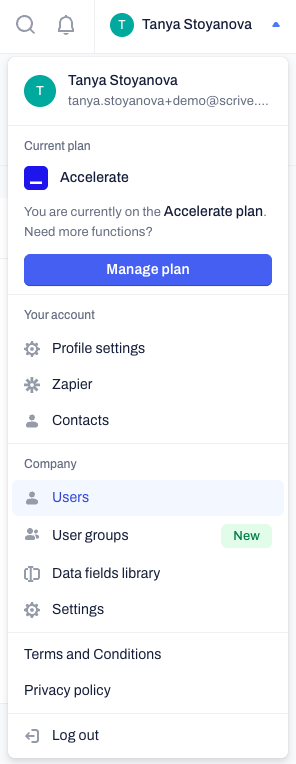
Click on your profile icon in the top right corner and select Users from the menu.
Click on the Invite new users blue button at the right-hand corner.
Enter the user's email address and send the invitation.
If your company uses SSO, new users cannot be added via the platform, but only through your SSO setup.

Assign flexible access permissions
Once a user accepts their invitation, they become active, and you can assign their permissions. If you need to know how to do that, click here.
Frequently asked questions
Why is the "Invite new users" button grey?
If the Invite new users button is grey instead of blue, this means your Company has reached its current seat limit. You can check the Seats count at the top of the Users page to see how many seats are currently in use. To request additional seats for your Company subscription, please contact our Support team.
How do I invite users if my company uses Okta or Microsoft Entra ID?
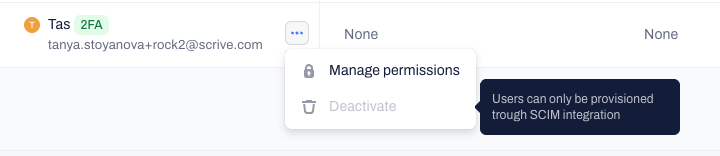
If your Company uses SSO and SCIM provisioning for automated account management, users cannot be invited through the Contractbook platform. New users must be invited to the Contractbook application directly within your Identity Provider (IdP) setup.
Where can I find and manage my pending invitations?
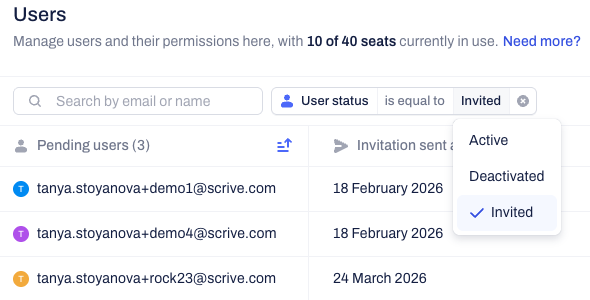
To view users who haven't accepted their invitation yet, click the User status filter on the Users page and select invited. From here, you can click the three-dot contextual menu next to a user's email to Resend or Revoke the invitation. Revoking an invitation immediately invalidates the link and frees up a seat in your Company plan.
Related articles
Understand and manage user permissions
Manage pending invitations
Organize users into groups
Was this article helpful?
That’s Great!
Thank you for your feedback
Sorry! We couldn't be helpful
Thank you for your feedback
Feedback sent
We appreciate your effort and will try to fix the article